A while ago we told you about text-to-speech tools that let you generate voices from text with artificial intelligence. Now we bring you an AI feature that video editors have been adding in recent years: automatic video subtitling.
First, it helps to define what subtitling is, because people often mix it up with other terms. Subtitling is the process of adding lines of text (subtitles) that appear at the bottom of the screen and represent the spoken dialogue of an audiovisual piece, in sync with the sound. Transcription is a different process: it turns everything spoken in a video into written text. A transcript is not overlaid on the screen, and it has no timecodes.
Subtitles also fall into two types: open and closed. Open subtitles are encoded into the video, so they always appear on screen and the viewer does not have to do anything. Closed subtitles live in a separate file, and the viewer can turn them on or off.
Benefits of subtitling
You may never have considered transcribing or subtitling your videos. It takes time and money, and most people who play them have no hearing difficulty. Even so, subtitles can bring real benefits, and with AI you can now add them at a low cost:- A clearer understanding of the content: reading the subtitles clarifies difficult terms, or sentences that are easy to miss if you only listen. In noisy places, or anywhere you are easily distracted, whether in public or at work, subtitles or transcripts let you follow the content without relying only on the audio.
- Search engine optimization (SEO): if the video is published online, the transcript includes keywords and relevant phrases from the video, which improves the chances that it will show up in search results.
- Greater accessibility: people with hearing disabilities, or who find the spoken content hard to follow, can understand it without difficulty.
- Regulatory compliance: in some cases, transcribing and subtitling audiovisual content is required in order to meet regulations and standards, especially in the public sector.
- Translating the video: if you want to reach audiences who speak a language other than the original, adding subtitles that translate the content is a good option. It is usually cheaper and faster than translating and producing the whole video again.
- Language learning: subtitles can also appeal to the viewer, who may treat them as a chance to learn a language when several languages are available.

How do you add open subtitles automatically with AI?
Several platforms let you add subtitles automatically. They are usually online video editors. Here is an example with the video editor FlexClip.You will usually find an option called “Subtitles” in the editing menu. It offers a few choices: generate them automatically, add them by hand, or upload a subtitle file (.srt or .vtt, for example).
Simply choose “Generate subtitles automatically”, or the equivalent option in your editor. In a few seconds you will have the subtitles. You can review and edit them if you find a mistake, and you can also adjust the timing.
Generating closed subtitles
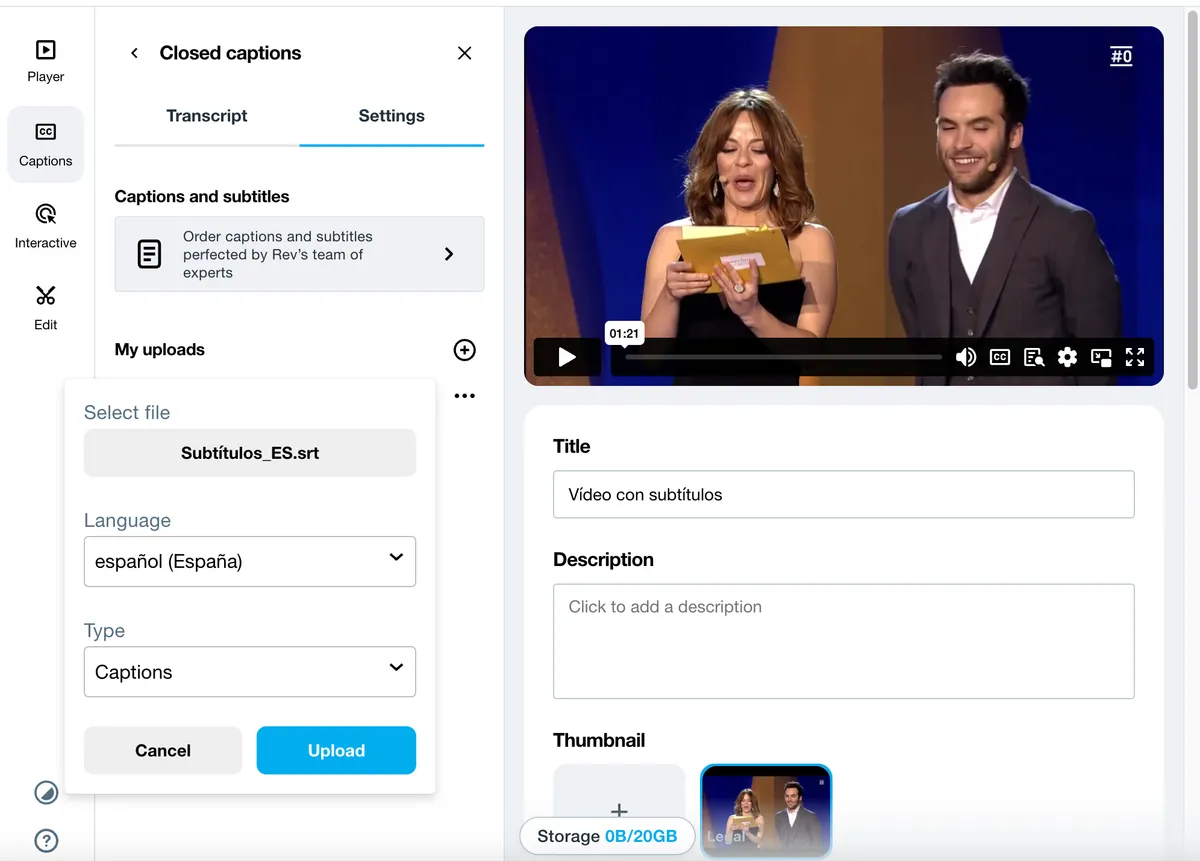
Sometimes you would rather not burn the subtitles into the video, and instead offer them as an option on players such as YouTube or Vimeo. To do that, download the subtitles generated in the video editor. You will get a file in SRT, TXT, STL, VTT or ASS/SSA format. These are subtitle formats: they include the timing and the written text. Also check that the format is compatible with the player you are using.Then upload that file together with the video. On Vimeo, for example, open the “Subtitles” tab (“Captions” in the English interface) in the side menu and upload the files. The viewer only has to click the CC icon on the player to turn the subtitles on. That leaves the choice of how to watch the video with the user.
What about live video?
Live subtitling for events, talks and similar sessions streamed as live video makes them accessible, and therefore inclusive, for everyone. Here, AI is a strong ally. Through speech recognition, algorithms that process natural language turn the voice into text. These systems have kept improving, so the subtitles they produce are more accurate.There are several ways to turn on real-time subtitling. Most operating systems, such as Windows or iOS, include the feature as standard. You only have to switch it on: live captions on Windows, captions on iPhone or captions on Mac. Platforms used mainly for conferences and virtual meetings, such as Zoom and Google Meet, also include this option.

If you want to keep exploring what AI can do, and the range of possibilities it offers, Snackson invites you to register for free until February for the microcourse Generative AI: the future of training. It covers tools for generating text, images and audio, and also the advantages and ethical challenges of this technology. Register now!
If you found this article useful, we recommend more posts from our blog:
Want to go further?
- Risks of using AI in the company (and how to train the team without slowing adoption) Read bite →

- Seven artificial intelligence microcourses so your team can understand, use, and manage AI with confidence Read bite →
- 45,000 public-sector professionals trained in LGBTI+ diversity thanks to microlearning Read bite →